
How to book seat reservation for Trenitalia Pass
To reserve seats for your Trenitalia pass, please use the link available on your confirmation page under the “PDF Tickets” section, where you’ll find the Trenitalia website link. This link is also included in your confirmation email for easy access.

Once you click the Trenitalia website link, you will be directed to the search page. Go to the “Book” tab, then click “Pass Number,” and enter your 10-digit PNR from your confirmation email (also available on your booking confirmation page), then add the passholder’s first name and surname. Finally, click on the search button to proceed.

On the next page, review the passenger details and enter your departure station, destination, and first travel date. This date also marks the start of your pass validity. Please note that once confirmed, it cannot be changed.
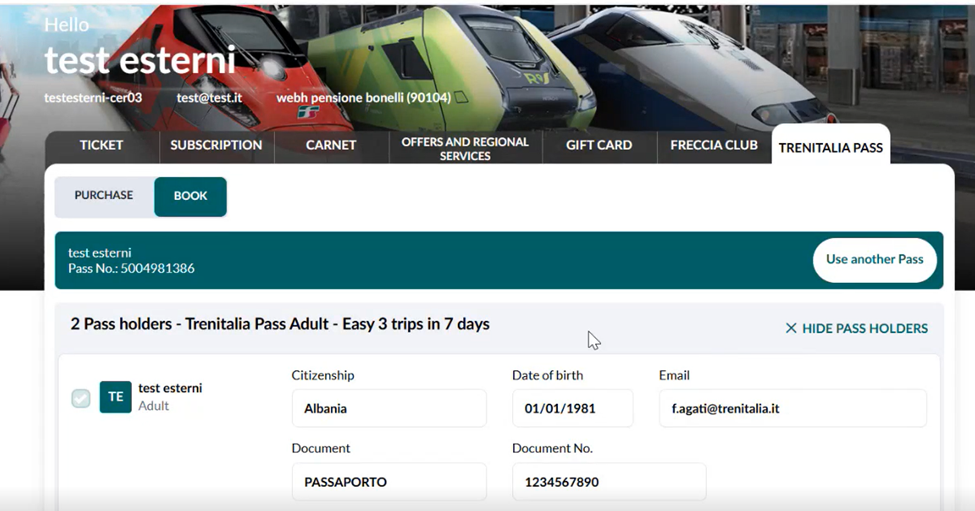


On the next page, you’ll see your booking details. Before confirming, click on the “Choose seats” option, select your seats, and then proceed to confirm.

On the next page, you’ll see the seat map. Select your preferred coach and confirm your selection.

On the next page, review the traveler details, accept the carrier’s conditions, and then click on the “Confirm” tab.

On the following page, you will find a summary of your booking confirmation, along with the option to download the PDF.

Seat Reservation Exchange Policy
You can exchange your seat reservation up until the scheduled departure time of your journey. Exchanges are permitted multiple times within the pass validity period, which is determined by your first travel date. Please note that once the pass start date has been selected, it cannot be changed. All modifications—whether to a different train or a different seat on the same train—must be made within the validity period of the pass.
Can I postpone my trip to a later date?
Yes, you can postpone your trip to a later date, provided the new travel date falls within the validity period of your pass.
Please note that changing the travel date of your first trip does not extend or modify the overall validity period of the pass. The validity period remains fixed based on the original start date selected.
User Guide
How to Activate and Use Your Trenitalia Pass Correctly
This guide is based on clarifications provided directly by Trenitalia regarding the activation and usage of the Trenitalia Pass purchased through Rail Europe.
----------------------------------------------------------------------
1. What is the Trenitalia Pass?
The Trenitalia Pass allows eligible travelers to book train journeys on the Trenitalia network using a predefined number of travel trips.
After purchase, you receive a Pass reference number and a PDF confirmation. The pass must then be activated and used through the dedicated Trenitalia Pass portal.
----------------------------------------------------------------------
2. Pass Activation
When the pass is activated, Trenitalia's system may generate a new booking reference (PNR).
For example:
- Original PNR: 2850786085 (may appear as "Deleted")
- New PNR: 2884736497 (may appear as "Confirmed")
Important
This behavior is normal and does not indicate a problem with the pass.
According to Trenitalia, both pass numbers remain valid and usable.
----------------------------------------------------------------------
3. Does the Pass Have a QR Code?
No.
The Trenitalia Pass itself does not contain a QR code.
What is checked on board?
Conductors do not verify the pass directly. Instead, they verify the reservation made using the pass.
Each reserved journey generates:
- A reservation confirmation
- A PDF ticket
- A QR code specific to that journey
The QR code on the journey reservation is what is checked during ticket inspection.
----------------------------------------------------------------------
4. How to Book Trips with Your Pass
✅ Correct Method
Reservations must be made through the dedicated Trenitalia Pass Portal.
Use the official access link provided with your pass purchase.
After booking, you will receive the reservation PDF containing the QR code required for travel.
❌ Incorrect Method
Do not make pass reservations through the standard Trenitalia App.
Using the app instead of the dedicated Trenitalia Pass portal may prevent the reservation from being recognized correctly and can lead to travel issues.
----------------------------------------------------------------------
5. Do I Need a New PDF After Activation?
No.
Based on Trenitalia's confirmation:
- There is no requirement to obtain a new pass PDF after activation.
- The original pass documentation remains valid.
- The important document for travel is the reservation PDF generated for each booked journey.
----------------------------------------------------------------------
6. Frequently Asked Questions
My original PNR shows as "Deleted". Is my pass invalid?
No. This is normal system behavior after activation. Trenitalia confirmed that the pass remains valid.
Does the QR code change after activation?
The pass itself has no QR code. QR codes are generated only when a journey reservation is made.
Why couldn't I travel even though my pass was valid?
The most likely reason is that the reservation was attempted through the standard Trenitalia App instead of the dedicated Trenitalia Pass portal.
What should I present on board?
Present the PDF reservation for your booked journey, including its QR code.
----------------------------------------------------------------------
Key Takeaway
The Trenitalia Pass itself does not contain a QR code and remains valid even if the original PNR is replaced during activation. To travel, reservations must be made through the dedicated Trenitalia Pass portal, and passengers must present the reservation PDF with its QR code during ticket inspection.