
How to book a Trenitalia Pass?
The Trenitalia Pass entitles you to travel in Italy (domestic routes only). The seat reservations for the trips included in the Pass are mandatory and free of charge for the following trains: Frecce, Frecce + Freccialink, Intercity, Intercity Night and Eurocity Italy-Switzerland trains (on domestic routes within Italy). A trip is one journey.
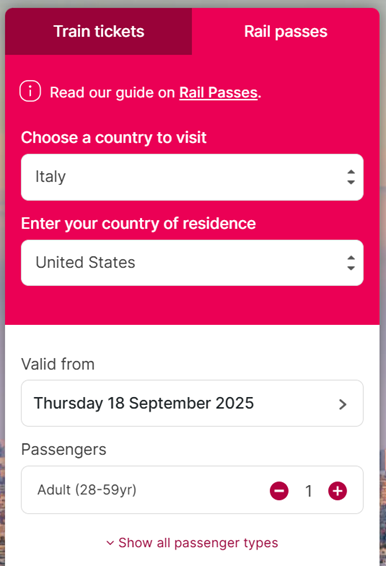
- Select the "Rail Passes" tab on the search page.
- Click on choose a country to visit, select Italy and then enter your country of residence.
- Select the valid from date, (the first journey must be booked within 11 months of the date of purchase).
- Add number of passengers and then click on search button.
You have now the Passes available to book. Select Trenitalia Pass, use the drop-down menu to select the number of trips and the class of service.
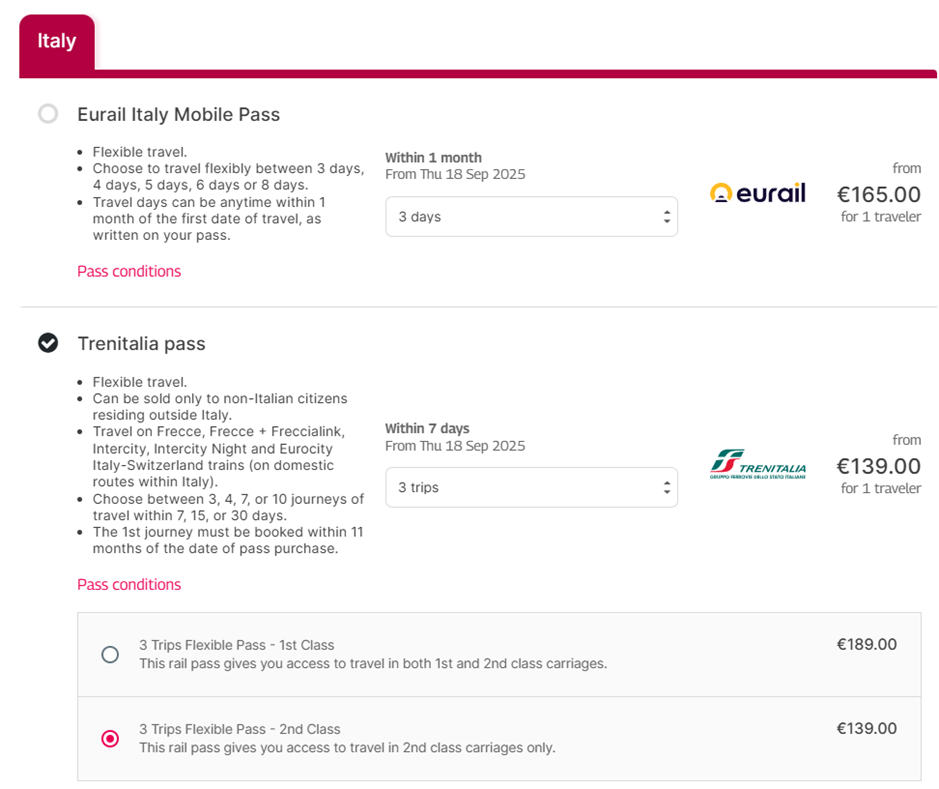
You can retrieve the Trenitalia Pass details as well.
Please fill in the traveler details and add your Trenitalia Pass to basket.
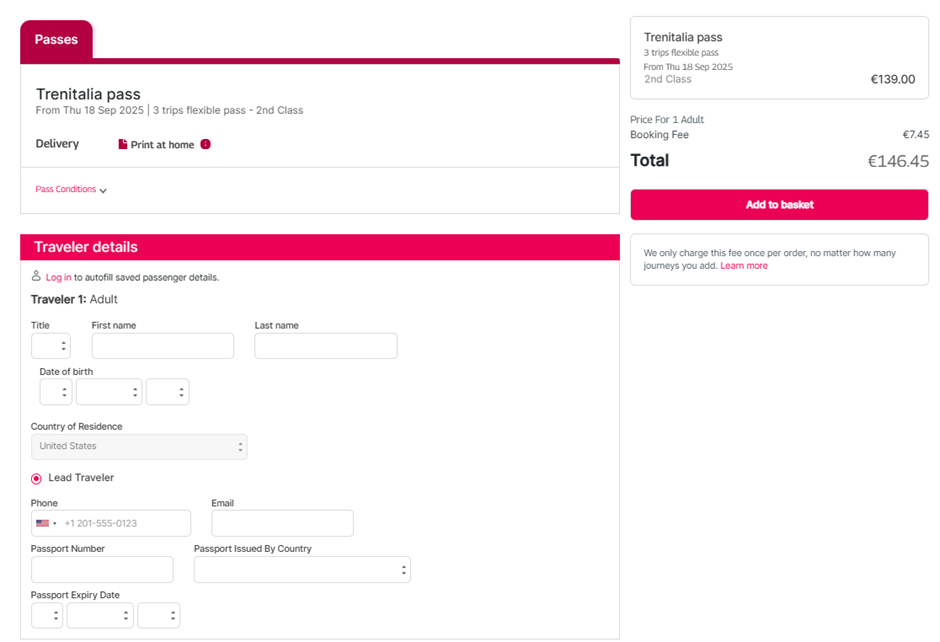
Review your basket and finalize your order on the payment page.
User Guide
How to Activate and Use Your Trenitalia Pass Correctly
This guide is based on clarifications provided directly by Trenitalia regarding the activation and usage of the Trenitalia Pass purchased through Rail Europe.
1. What is the Trenitalia Pass?
The Trenitalia Pass allows eligible travelers to book train journeys on the Trenitalia network using a predefined number of travel trips.
After purchase, you receive a Pass reference number and a PDF confirmation. The pass must then be activated and used through the dedicated Trenitalia Pass portal.
----------------------------------------------------------------------
2. Pass Activation
When the pass is activated, Trenitalia's system may generate a new booking reference (PNR).
For example:
- Original PNR: 2850786085 (may appear as "Deleted")
- New PNR: 2884736497 (may appear as "Confirmed")
Important
This behavior is normal and does not indicate a problem with the pass.
According to Trenitalia, both pass numbers remain valid and usable.
----------------------------------------------------------------------
3. Does the Pass Have a QR Code?
No.
The Trenitalia Pass itself does not contain a QR code.
What is checked on board?
Conductors do not verify the pass directly. Instead, they verify the reservation made using the pass.
Each reserved journey generates:
- A reservation confirmation
- A PDF ticket
- A QR code specific to that journey
The QR code on the journey reservation is what is checked during ticket inspection.
----------------------------------------------------------------------
4. How to Book Trips with Your Pass
✅ Correct Method
Reservations must be made through the dedicated Trenitalia Pass Portal.
Use the official access link provided with your pass purchase.
After booking, you will receive the reservation PDF containing the QR code required for travel.
❌ Incorrect Method
Do not make pass reservations through the standard Trenitalia App.
Using the app instead of the dedicated Trenitalia Pass portal may prevent the reservation from being recognized correctly and can lead to travel issues.
----------------------------------------------------------------------
5. Do I Need a New PDF After Activation?
No.
Based on Trenitalia's confirmation:
- There is no requirement to obtain a new pass PDF after activation.
- The original pass documentation remains valid.
- The important document for travel is the reservation PDF generated for each booked journey.
----------------------------------------------------------------------
6. Frequently Asked Questions
My original PNR shows as "Deleted". Is my pass invalid?
No. This is normal system behavior after activation. Trenitalia confirmed that the pass remains valid.
Does the QR code change after activation?
The pass itself has no QR code. QR codes are generated only when a journey reservation is made.
Why couldn't I travel even though my pass was valid?
The most likely reason is that the reservation was attempted through the standard Trenitalia App instead of the dedicated Trenitalia Pass portal.
What should I present on board?
Present the PDF reservation for your booked journey, including its QR code.
----------------------------------------------------------------------
Key Takeaway
The Trenitalia Pass itself does not contain a QR code and remains valid even if the original PNR is replaced during activation. To travel, reservations must be made through the dedicated Trenitalia Pass portal, and passengers must present the reservation PDF with its QR code during ticket inspection.