
Places (hotels) to stay feature - Activation / Deactivation
Recently, for the convenience of Rail Europe clients who may wish to book hotels in the destination city of the sector ticket they are about to book, an automatic browser window would open up, with hotel options, for the check in date, based on the train's arrival date. You may choose to deactivate this. To deactivate, follow the instructions below:
1) Go to Raileurope.com's homepage.
2) On the left side of the window, look for the "Explore places to stay" tab. This will appear below the 'Train tickets' section (see screenshot below)
 3) Click the tab to disable automatic booking.com searches.
IMPORTANT:
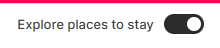
The Button onto the right (as above) means that the booking.com hotel suggestions are turned on.

The Button onto the left (as above) means that the booking.com hotel suggestions are turned off.